Lagoon Studio
A Mac-native video analysis tool for motion detection and b-roll discovery. Vibe-coded end-to-end with Claude Code, designed around Apple's Human Interface Guidelines, and built to disappear into the platform it runs on.
The premise
Editors spend hours scrubbing through footage looking for the moments that matter: a gesture, a cut, a beat. Lagoon Studio does that pass for you. Drop a video in, and it surfaces segments by motion intensity, ranks them, and lets you jump straight to the good stuff.
Designed for macOS
Lagoon Studio was designed from the beginning as a proper Mac app, not a cross-platform port. It's built almost entirely in SwiftUI, and every surface leans on Apple's Human Interface Guidelines: system materials and vibrancy for the chrome, the standard three-pane inspector pattern you'd expect from Final Cut or Preview, and a toolbar that behaves the way Mac toolbars are supposed to behave. The result is an app that feels native on day one, because it is.
Controls follow platform conventions rather than inventing new ones. The sidebar uses SwiftUI's NavigationSplitView, inheriting the column-resize and collapse behavior people already know from Mail and Finder. Segment rows get standard List selection and keyboard-navigation for free. Right-click anywhere and you get a contextual menu composed with SwiftUI's .contextMenu modifier, built from the Mac's contextual-menu vocabulary with toggles, checkmarks, and sensible defaults.
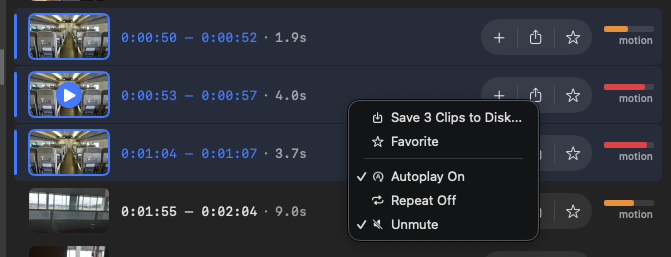
.contextMenu and the toggle and checkmark semantics Apple specifies.The timeline is the product
The motion graph sitting above the player is the design centerpiece. Rather than a flat scrubber, it's a live waveform of motion intensity, rendered as analysis progresses. Detected segments highlight as colored bands directly on the graph, so the visual summary of the video is the navigation surface.
The interaction language here matches the rest of the Mac: click a band to jump, drag to scrub, hold ⌘ to multi-select. The color coding is intentionally quiet. Red for motion, because that's the convention Lagoon is inviting you into, not a decoration.

Format agnostic
Lagoon handles anything you throw at it: ProRes masters, phone portrait clips, archival DV, short TikTok-ratio verticals. The player adapts to the aspect ratio of the source without letterbox gymnastics, and the analysis pipeline treats a 9:16 vertical the same as a 16:9 landscape. The idea is that the app should meet your footage where it lives.
Under the hood
Frame analysis runs in batches via Swift's TaskGroup, keeping memory bounded on multi-hour videos. Playback routes through AVPlayer by default and falls back to mpv for codecs the system framework can't handle cleanly. The engineering is deliberately invisible. You shouldn't think about it, and you don't.